

Shades of Gray for WordPress Sandbox
Published on August 5, 2007 in WordPressShades of Gray is not a theme for WordPress itself, but a skin for the WordPress Sandbox theme. Shades of Gray is a minimalist, two column fluid-width theme. It is primarily a grayscale skin but could easily be modified to use whatever colors you desired. If you would like to play around with the skin in the wild feel free to download it and give it a try.
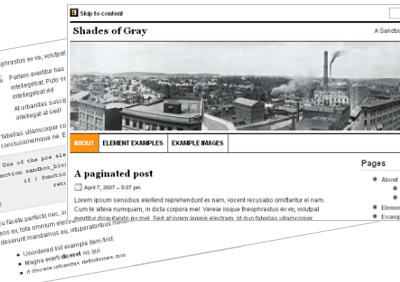
Installing Shades of Gray is simple. Just follow the steps below.
1. Upload the sandbox-shadesofgray folder to your Sandbox folder in the wp-content/themes/ on your server.
2. Edit the default Sandbox style.css file, so that it loads the Shades of Gray skin. You can do this by replacing current @import url… line with this one:
@import url(’sandbox-Shades of Gray/style.css’);
Download the skin from the Sandbox Design page.
Note that you must have Sandbox installed to use Shades of Gray, if you don’t have Sandbox you can get it here.
Modifying Shades of Gray
Feel free to modify Shades of Gray in any way you like. To make the skin your own you should replace the icon in the top left corner of the screen and the panoramic image spreading across the top of the page with images of your own. In addition, the Shades of Gray skin includes numerous print styles to format the page for printing and is also designed to format a WordPress category named ‘Asides’ differently than other categories. Either one of these can be changed or removed entirely. More details on how to to this is in the readme file in the download.
License & Credits
Shades of Gray is released under the GNU General Public License, meaning you can do pretty much whatever you want with it, but a link back to lesliefranke.com is always appreciated. Of special note some of the icons in Shades of Gray have been adapted from the “Mini” (http://www.famfamfam.com/lab/icons/mini/) icon collection by Mark James and the Feed Icons are from http://www.feedicons.com/.


Shades of Gray is awesome Leslie! It really fits what I like in web design. I think you will fair well in the SDC. Good luck to you
Will,
Thanks for the kind words.
Congratulations, Leslie. Shades of Gray is a great theme.
Will you continue to improve, update and support the Shades-Of-Gray theme ?
Wow.
Really great skin. I was looking for some NE Oh blogs and came across this. Really amazing work.
Very cool theme Leslie. I am really happy to say that I used it on my blog. Thanks for your work!
Leslie
love the design
just left a post at sandbox asking about your plans (i hope) to introduce a 3 column version (bog text in the middle)
much appreciated
cheers
Hey leslie! Just wanted to say I love the theme.. great, elegant, clean basis. I’m modifying it (heavily) for a site I’m working on currently (www.radioslipstream.com/wp). I’m currently confused though as to why it is centered in IE and right on the left in Firefox? is this just default behaviour of the browsers? I’d like to force it to the left.
Hi Leslie, I love your theme Shades of Grey. Thanks so much for designing it.
I am having a problem and don’t know where it comes from. My blog doesn’t show in firefox. I upgraded ff and got their plugins at the same time that I upgraded to wp2.3
So is the theme compatible with 2.3? or maybe it’s the plugins that are interfering.
The firebug shows as follows:
87 dropdown.onchange = onCatChange;
Myhost says that my data base is aomehow not complete and I might have to download wp again.
Any ideas?
Thanks
Luz
(post_id, category_id) VALUES (1748, 3)
WordPress database error:
Luz,
The skin if for the latest version of Sandbox which works with WordPress 2.3. My guess is that you have some plugin that is interfering (maybe a category widget???). Try disabling all of your plugins and enabling one by one to see if you can trap the error.
love the design
I’ve been using Shades of Gray for a while now, and I love it. One question though.
For the first time, I have a static page that is a child of another page. The link does not show in the tabs across the top of the page. Is there some way to get the page hierarchy to display?
Thanks again for a very cool and clean design.
Jeremy,
The page hierarchy can display in one of two manners: as the child pages being a drop down menu under each parent page or as the child pages just being another page in the horizontal menu. Let me know which way you would like and I can post the CSS code you will need to make the change.
Yes very good desing. Congrats.
Thank you very much, Leslie, I was just about to launch my blog with a heavily modified shades-of-gray when they released wordpress 2.5. Now I’m unsure what to do; launch first or upgrade first..? Do you have any idea if your shades-of-gray will work with the new wordpress? And/or with the new sandbox version?
I’m really confused and unsure now. And sad, since I wanted to launch my (private) blog (only for friends & family) with an April fools joke.
Would appreciate any help you could give.