Mozilla Firefox Cheat Sheet Update
Published on June 22, 2006 in FirefoxI have updated the Mozilla Firefox Cheat Sheet to include a couple of suggestions that have been made. Changes include:
- Tab Select shortcuts
- Undo shortcut
- Another Open Link in Background Tab shortcut
- Changed the path to cached elements
Available in the following formats:
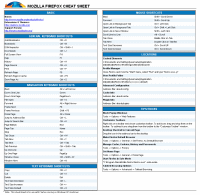
Note: The location of the PDF has changed.


very useful, thanks!
Hi Leslie:
I came for the Firefox cheatsheet, but was pleasantly surprised to discover that a fellow SDA has found fame and fortune via LifeHacker. Good luck with the Pathfinder kids- my favorite part of the weekly meetings was ditching and hiding out in the nearby woods while the counselors hunted for us. Hope you don’t have too many like me.
Thanks for the cheatsheet!
Andrew Schoppe
Very useful, thanks. However, for the “Back” function, it’s easier to use the backspace key, instead of Alt + left arrow.
For the “Forward” function, use Caps + Backspace.
Hi – I’m sure this sheet is brilliant, but it would have saved a few wasted minutes of my life if there had been an obvious pointer that it’s for XP only before I downloaded it. There are other OSs out there, you know
I love this cheat sheet, Ho wuseful! Thank you!
Gret guide, Im running Ubuntu Dapper (which looks sexier that windowsANYVERSION), and since i bothered to open up a term and sus out hte firefox command for linux, here is my additions so that peopl like nick dont turn around and walk off in a bloated elitist huff.
uhh nick, your only a little bit right. most of the stuff works for firefox regardless, casuse firefox is built on top of xul and gekco ra ra ra. multiplatform ra ra ra ra. But there are differnces here they are.
- ctrl+j puts focs on your search widget thingy next to your url bar.
- ctrl[1-9] doesn’t do anything, me thinks this is because its taken by the system core for multi terminal access. hehehe, wait till you windows users get this feature on your desktops.
locations
————
- Profile Manager
Close Firefox. Open up a term and type “firefox -ProfileManager”
- User Profile file : ~/.mozilla/firefox/profiles/xxxxxxxx.default
- Cached Elements folder : im still trying to fnid this, for simply assuming that it will be in the same place as the profile turned up nothing.
be back soon.
lol, care not i for my spelling
oh and leslie, this line at the bottom:
For use with Firefox running on a Windows machine.
Should read :
For use with Firefox running on Windows, Mac, Or Linux system.
Very imformative. Thank you. I plugged you at Invision-graphics.com. Just click on my name to see the post.:)
“Back” function is also triggered by backspace key.
Nice work! Anyone know how to configure firefox to, when pressing ctrl-enter, instead of adding www. and .com pre/suffix’s, it adds just .com, hence http://www.google.com -> http://google.com
Another handy shortcut, if you re-arrange your tabs often, like I do:
ctrl+shift+pageup/down to move your tab one slot to the left or right.
Works fine in Linux as well. Been using it since forever. )
)
(or is it a tabbrowser extensions feature? must have extension anyways
I was messing around trying to figure out how to open a link in a new tab when you type it into the location bar:
ALT + Enter – opens new tab instead of using current page when used in either the location bar or the search box
Everyone…Sorry for not replying sooner. I will incorporate some of you suggestions into an updated version soon.
Andrew…It is nice to hear from a fellow Adventist.
airtonix…Thanks for mentioning the shortcuts.
Please add firefox cookies/bad web sites immunization in next version!
Firefox 2 cannot reject third party cookies!!!!!!!!